

Instead of manually rethinking your juice order after every Strava upload, set up a weekly training review and a delivery-planning reminder so you can choose drinks alongside your usual meals. This 2026 workflow keeps the ordering decision with you: review your sessions in Strava, check what is in the fridge, then order from Homejuice after checking delivery arrangements for your address.
- Use a weekly reminder for strava training juice delivery; review sessions before placing a cold-pressed juice order.
- Homejuice suits Melbourne and Victorian shoppers seeking organic cold-pressed juice alongside their usual meals.
- Keep checkout manual in this workflow; a recorded activity is not an instruction to buy.
- Choose by ingredients, taste and storage needs, not by an assumed exercise-to-bottle formula.
Why this matters
A training log and a shopping list serve different purposes. Strava records your activity; your juice order needs to account for your household, preferences, remaining bottles and the delivery arrangements you confirm before buying.
Homejuice cold-pressed juice is best for Melbourne and Victorian shoppers who want organic drinks alongside their usual meals. The practical benefit is less preparation, not a personalised sports-nutrition prescription.
For your 2026 training calendar, use a reminder as the bridge between exercise tracking and shopping. This guide does not connect your Strava account to the store, transfer activity data or submit orders automatically. You stay in control of both the quantity and the purchase.
Before you start
- Have access to your own Strava account and a calendar or reminder app. You only need to review your activities; this workflow requires no developer account, access token or shared password.
- Have your delivery address, ingredient preferences and fridge space ready. Read the current product information and confirm delivery arrangements before choosing a date for your routine.
- Separate activity dates from delivery dates. Recording a run does not reserve a delivery. Build your reminder around the ordering arrangements you actually confirm, rather than assuming a bottle can arrive after your next session.
Keep the first version small. Set one recurring review every 7 days, then adjust the schedule if it does not fit your training week. That interval is a planning suggestion, not a delivery schedule or a recommendation about how often to drink juice.
You do not need to share your routes, heart-rate records or other activity details with a retailer to follow these steps. A short private shopping note is enough.
Training review
Check your completed and upcoming sessions
- Open your own Strava account and review the activities you completed during the current training week. Use the records as context, not as a bottle calculator.
- Check your separate training plan for upcoming sessions. Keep planned exercise distinct from completed exercise so a changed workout does not become an unnecessary purchase.
- Write a short note describing the practical week ahead: when you will be home, when you will be away and whether anyone else will share the order.
- Count the unopened bottles already in your fridge. Check their labels before deciding what belongs on the shopping list.
- Decide whether you need another order at all. Keep a clear no-order option in the routine.
Expected result: you have a household shopping decision informed by your schedule, rather than a purchase triggered by every workout.
Avoid turning distance, pace or recorded exercise energy into an order quantity. This workflow contains no exercise-to-juice conversion, and the product descriptions do not provide one.
For a beginner, the useful question is simple: will you enjoy these drinks during the week you are planning? Start there. You can keep detailed training analysis separate from the shopping task.
Reminder setup
Create your weekly review prompt
- Choose a regular time when you can check both your training week and the fridge. Set aside 10 minutes as a starting point.
- Create a recurring calendar event or reminder. Enter Training and juice review as your own event title; this is suggested text, not a named feature in an app.
- Add a short checklist to the event description: Review sessions, Check bottles, Confirm delivery, Choose drinks and Place order. These are your checklist labels, not store buttons.
- Set the reminder to repeat every 7 days. Select the notification timing that works for you in your chosen app.
- Add a final line: Skip the order when nothing is needed. A recurring review should not become a recurring obligation to buy.
Expected result: your calendar prompts one deliberate review, while checkout remains a separate action you approve.
Use those same checklist labels throughout your 2026 training block. Consistent wording makes the reminder easier to scan when you are busy; you do not need to rebuild the process for each session.
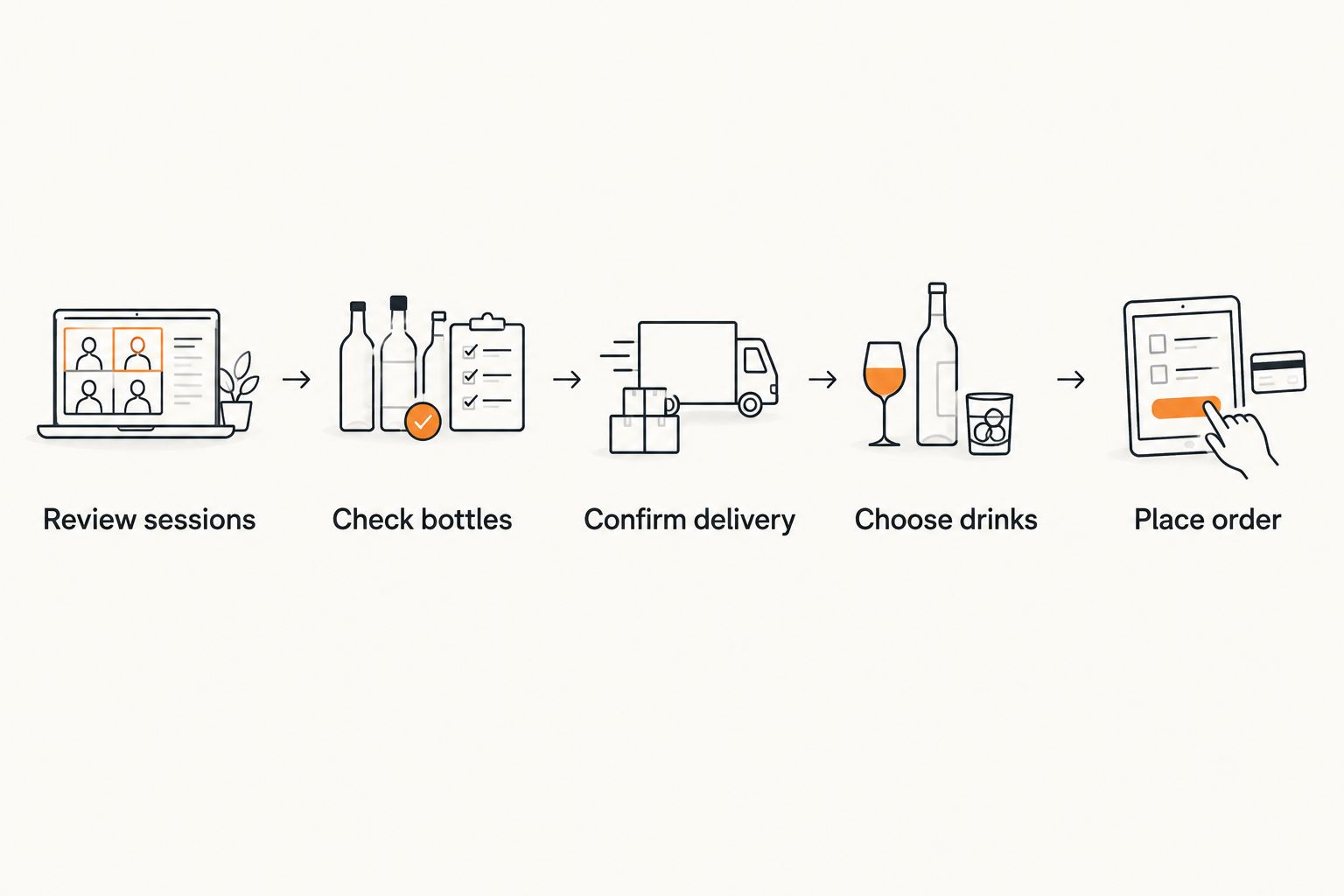
Keep the event description short enough to use. If you find yourself writing a detailed training report inside a shopping reminder, move that information back to your training notes and leave only the decisions needed for the order.
Juice selection and ordering
Choose by ingredients and taste
Homejuice cold-pressed juice is 100% certified organic, made with no heat, and contains no additives or preservatives. The range includes 375 ml servings and recyclable packaging. Those are product characteristics, not evidence that a particular bottle matches a particular workout.
For this workflow, start by comparing straightforward ingredient lists. The following options offer a clear choice between a mixed fruit-and-vegetable blend and celery alone.
| Option | Best for | What is in it | Practical advantage | Limitation |
|---|---|---|---|---|
| Summer Sunset | Beginners who prefer a sweeter blend | Carrot, apple, orange and turmeric | Offers a mixed blend described as the sweetest juice in the range | Not the choice for someone specifically seeking a single-ingredient drink |
| Celery Juice | Shoppers who specifically want celery | 100% celery juice | Makes the ingredient choice straightforward | Does not offer the fruit-and-vegetable variety of the mixed blend |
Choose Summer Sunset for a sweeter mixed blend; choose Celery Juice when celery is what you actually want. Neither choice needs to be justified by your pace, training distance or a promise of a physical outcome.
The convenience of prepared juice comes with a practical responsibility: check ingredients and follow the storage instructions supplied with your order. A ready-made bottle removes preparation work, but it does not remove those checks.


Confirm the order details
- Read the current ingredients for your chosen drink. Check every product separately rather than treating all juices as interchangeable.
- Choose a quantity based on your intended use, existing bottles and the storage instructions. Do not multiply your workout count by an assumed serving requirement.
- Enter your actual delivery address and review the delivery information presented during ordering. Confirm any timing you need before finalising the purchase.
- Check that someone can receive and store the order according to the supplied instructions. Resolve any uncertainty before committing to a training-day plan.
- Complete checkout yourself, then record the confirmed order details in your calendar. Keep an unconfirmed preferred date separate from confirmed arrangements.
Expected result: your calendar contains the order information you received, not a date inferred from a Strava activity.
For your first 2026 order using this routine, leave the quantity decision manual. Once you understand your own preferences and use, the reminder will become quicker without needing to make the purchase automatic.
Variant: review the order when your training week changes
A weekly review handles the ordinary routine. A second useful workflow is a manual recheck whenever your plans change substantially, such as a weekend away or a session moving to another day.
- Update your training plan first. Do not use the shopping reminder as the main record of your workouts.
- Open the existing training-and-juice reminder rather than creating another overlapping one.
- Recheck who will be home, what remains in the fridge and whether the planned quantity still makes sense.
- If you have not ordered, revise or skip the shopping list. If you have already ordered, check the applicable order-change arrangements rather than assuming you can alter it.
- Update your calendar only after you receive confirmation of any changed delivery details.
Expected result: a training change leads to a review, not a duplicate order.
The advantage is flexibility: your shopping follows your actual week. The limitation is that you must initiate the recheck yourself; this guide does not install an activity-update trigger or monitor changes in your account.
Keep this distinction in your 2026 setup: a reminder asks you to decide; it does not decide for you. That is especially useful when a cancelled session changes your day but does not change what you want to drink.
Troubleshooting
The reminder appears after you needed to order
Move the review earlier using the delivery arrangements you have confirmed. Do not solve the problem by assuming faster delivery; align the reminder with the actual ordering process instead.
Several activities lead to several shopping reminders
Keep one recurring review and remove duplicate reminders you created. Review all relevant sessions together, then make one shopping decision for the household.
The shopping list no longer matches what is in the fridge
Count bottles before checkout, not only when the reminder was first created. Update the list to reflect what is actually there and check the supplied storage information before planning to use it.
You cannot receive the order as planned
Check the current delivery and order-change arrangements before making another commitment. Do not assume that a different address, unattended delivery or a changed date is automatically acceptable.
The workflow starts feeling like another training task
Reduce the reminder to three questions: what is already here, what do I want, and can I receive it? Keep the detailed session review in Strava rather than duplicating your training diary inside a shopping list.
Customise your workflow
After using the reminder, change only the parts that caused friction. Move the review time if you repeatedly dismiss it, simplify the ingredient shortlist if choosing takes too long, or add a household check if more than one person orders.
A shared calendar can hold the receiving arrangements without containing anyone's exercise records. Keep personal training data in your own account, and share only the order details needed by the person receiving the delivery.
For a longer training block, add a separate end-of-block review. Ask whether the routine helped you plan, whether you enjoyed the drinks and whether the quantities matched your use. Assess the shopping process on those terms, not on changes in exercise performance.
Keep the useful automation—the reminder—and keep the purchase decision yours. A simple routine that you follow is more practical than an elaborate connection you have to maintain.
FAQ
Can Strava automatically order juice after my run?
This guide does not set up automatic ordering. It uses a recurring reminder, a manual Strava review and a checkout decision that you approve yourself.
What is the simplest strava training juice delivery workflow?
Review your training week, count your remaining bottles, confirm delivery arrangements and place an order only when you need one. A recurring calendar reminder keeps those steps together without transferring your activity data.
Do I need to give Homejuice access to my Strava account?
No account access is needed for this manual workflow. Keep your training records private and use a short shopping note to plan your order.
Which juice should a beginner choose for this routine?
Summer Sunset suits beginners who prefer a sweeter mixed blend, while Celery Juice suits shoppers who specifically want celery alone. Choose by the current ingredients and your taste preferences, not by the distance you exercised.
How many bottles should I order for a training week?
Choose the quantity from your intended use, remaining bottles and supplied storage instructions. This workflow does not assign a bottle count to a workout or training distance.
Does a recorded workout confirm my delivery date?
No, a Strava activity is not a delivery confirmation. Record delivery details only after checking the ordering arrangements and receiving the relevant confirmation.
Is this a personalised recovery nutrition plan?
No, this is a shopping and scheduling workflow. It helps you organise cold-pressed juice alongside your usual meals; it does not prescribe what to consume after exercise.
One last thing
Add an explicit No order needed outcome to your reminder. A useful workflow sometimes ends without a purchase because you already have what you want. That small permission keeps the routine focused on your week rather than on completing a checkout.